
Introduction
This project was a hands-on assessment of a legacy PowerPC‑based DECA appliance – from raw UART to safe firmware extraction and a clean, persistent console. We set out to: (1) gain repeatable root access without writing flash, (2) map and copy the firmware and config partitions for offline analysis, and (3) surface vendor code paths most likely to hide security‑relevant logic (additional RE findings in the near future!).
What We Actually Did
- Got root access without writing flash by booting the vendor kernel/ramdisk/DTB with an extra
init=/bin/sharg from U‑Boot. - Fixed the minimal shell (mounted
proc/sys/devptsand gave ourselves tmpfs/tmp+/var) so tools behaved. - Brought up networking on the correct interface (
br0, noteth0), first via link‑local169.254.1.100/16, later static192.168.2.1/24. - Exfil’d firmware and configs through UART using uuencode.
- Mapped flash via
/proc/mtdand dumped key partitions in chunks. - Triage‑scanned the filesystem for vendor strings and secrets; noted cleartext WPS PIN and HTTP update URL in bootloader env.
- Identified vendor libraries likely worth reversing (
libhash.so,libiofrwk.so,libsystem.so) and who links to them (Coming to you soon). - Built a safe path to make serial console persistent by extracting, editing, repacking, and test‑booting the ramdisk from RAM before flashing.
The Device
- DirecTV Cinema Connection Kit
- Model: DCAW1R0-01
- FCC ID: NKR-DTVDCCK
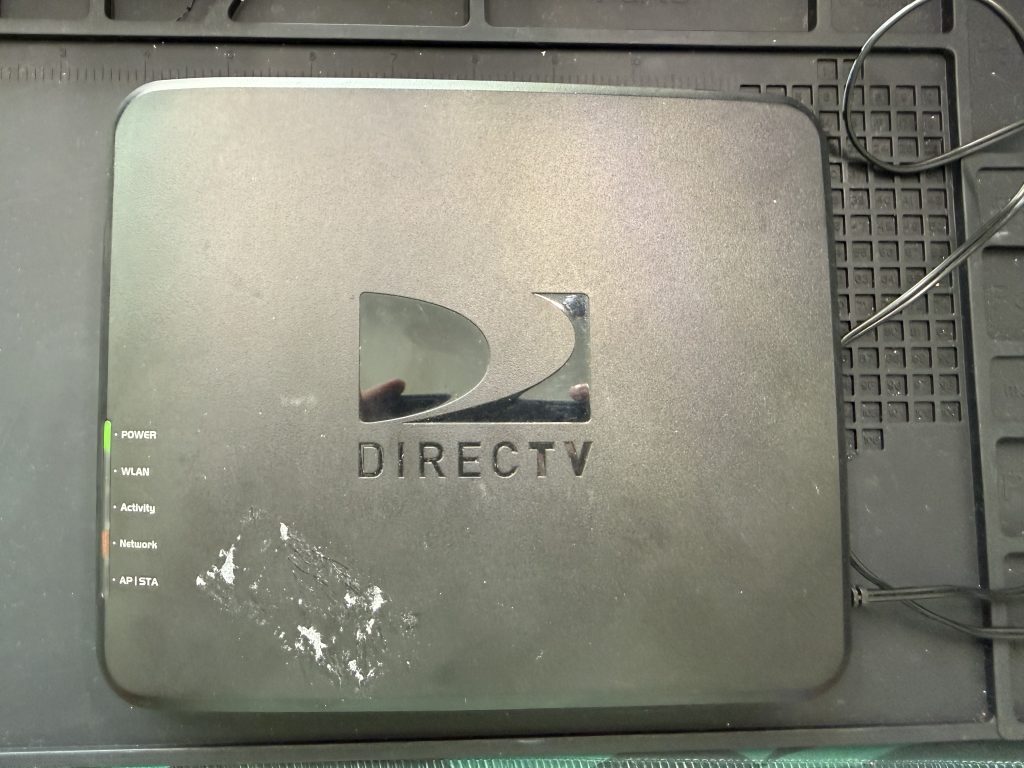
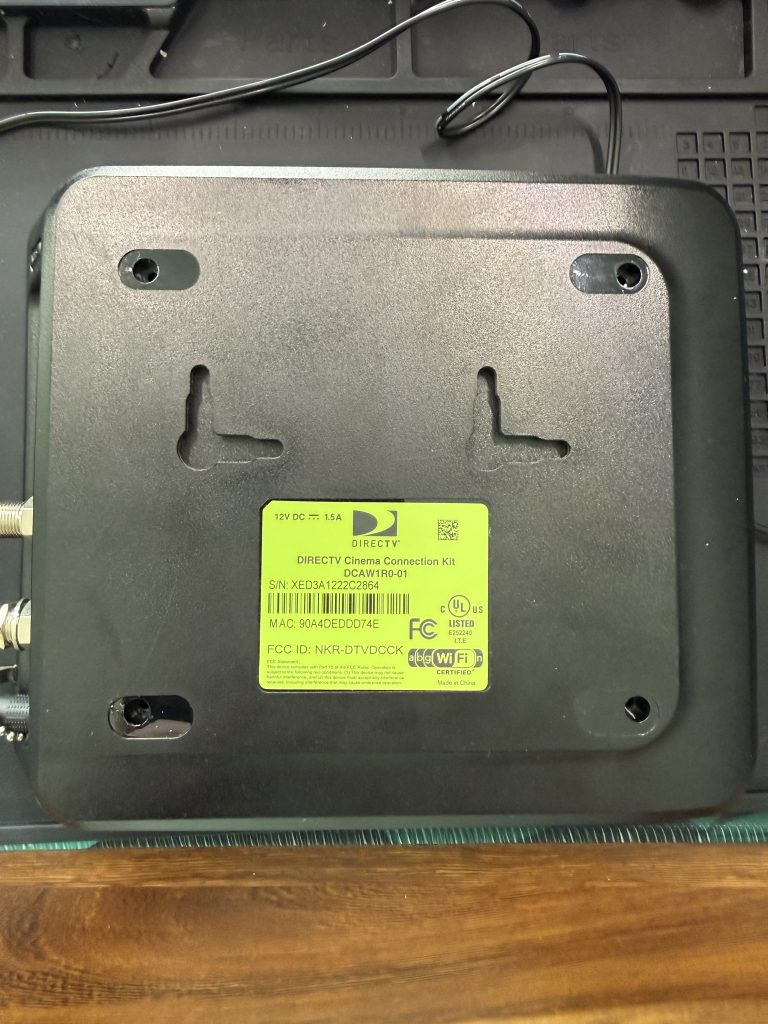
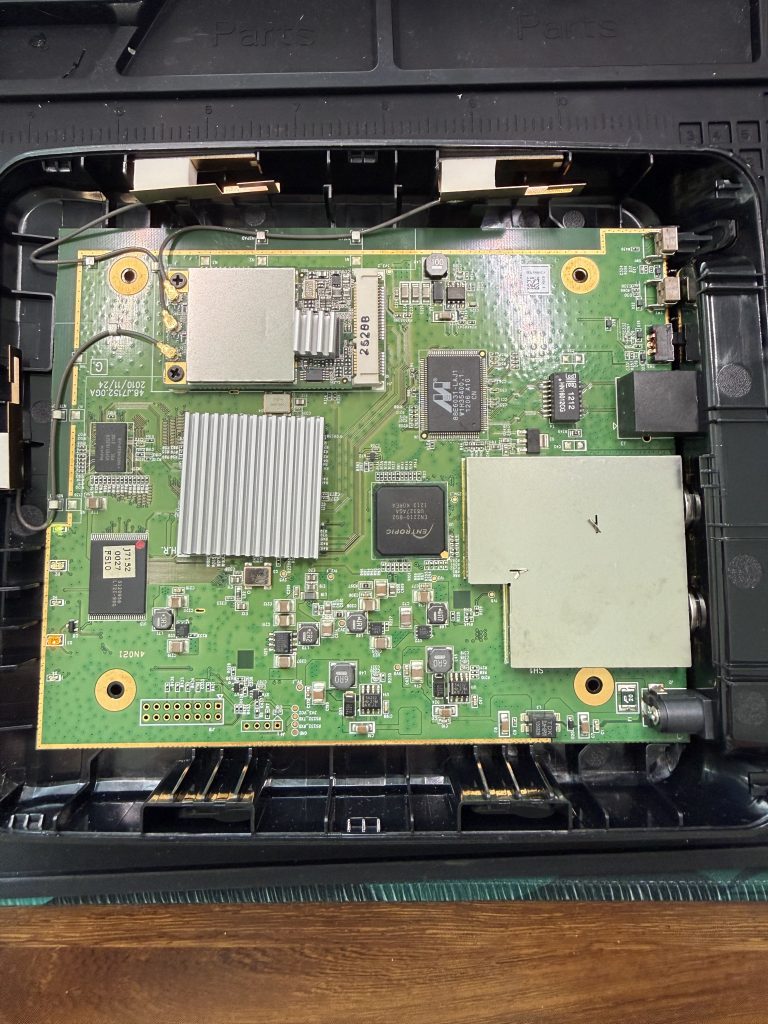
Upon cracking the device open, I quickly ran through each chip, traced my connections, and went on the hunt for valid and active UART or JTAG entry points.
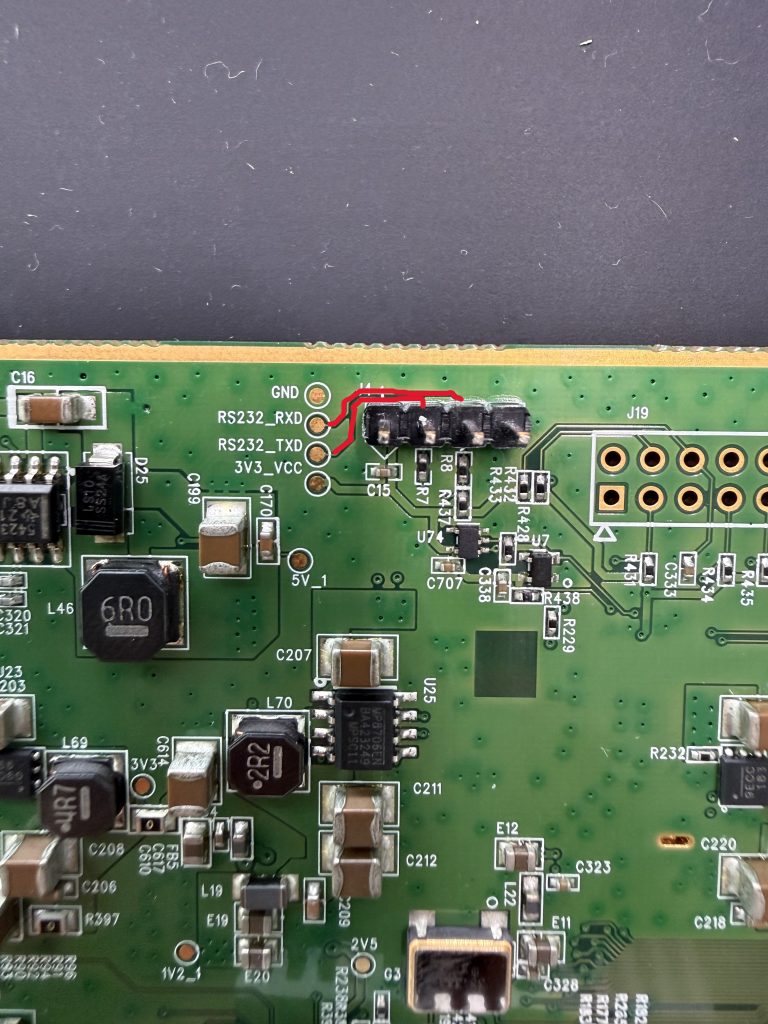
Nicely labeled for me were what appeared to be UART pads traced to PCB mounting holes that I was able to solder my headers into. Testing with a multi-meter and monitoring for voltage drops on the TXD header, I was quickly able to confirm that this is likely an active UART.
Boot Time
<doing_things>
We are connecting UART here and booting the device. If you need help with this, there are tons of great communities and videos out there like Matt Brown who can break it down for you
</doing_things>
We successfully booted the device and in my picocom capture, I was greeted with a museum artifact U-Boot (2009.11.1)!!
Not only was this awesome, I had an option to stop autoboot and likely get some low level shell or U-Boot bootloader menu where we can menu dive and attempt to establish our first foothold.
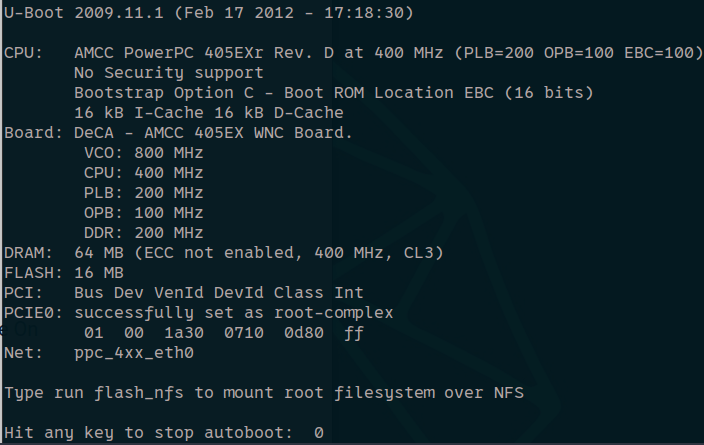
Bootloader Recon (Where the Device Introduced Itself)
As expected, we were dropped into a U-Boot bootloader terminal:
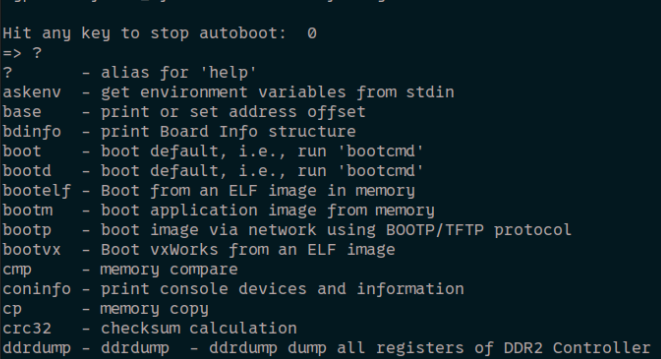
Digging through a few of these options, it looked like printenv spilled the exact boot recipe:
U-Boot 2009.11.1 (Feb 17 2012)

kernel_addr=0xff000000
fdt_addr=0xff1e0000
ramdisk_addr=0xff200000
kernel_size=1966080
fdt_size=131072
ramdisk_size=5636096
flash_self=run ramargs addip addtty addmisc; bootm ${kernel_addr} ${ramdisk_addr} ${fdt_addr}
net_self=...  # netboot recipe
upd=run load update
load=tftp 200000 ${u-boot}
u-boot=deca/u-boot.bin
update=protect off 0xFFFA0000 FFFFFFFF; era 0xFFFA0000 FFFFFFFF; cp.b ${fileaddr} 0xFFFA0000 ${filesize}; saveenv
update_url=http://192.168.1.1/DecaW/Upgrade_...py
wps_pin=27513989
One‑Time Root: Riding the Vendor Boot
We didn’t flash anything. We just appended a kernel arg to borrow PID 1 for a shell:
=> setenv addmisc 'setenv bootargs ${bootargs} init=/bin/sh'
=> run flash_self
BusyBox popped a root shell on a read‑only SquashFS. Immediately, common tools whined because proc/sys/devpts weren’t mounted, as we bypassed the intial boot inittab spinup process (where mounts, services, etc are configured upon boot). We fixed the world and gave ourselves RAM to write temp files:
# core pseudo‑filesystems
a) mkdir -p /proc /sys /dev/pts
b) mount -t proc   proc   /proc
c) mount -t sysfs  sysfs  /sys
d) mount -t devpts devpts /dev/pts 2>/dev/null || true

# writable scratch
e) mount -t tmpfs -o mode=1777,size=32m tmpfs /tmp
f) mount -t tmpfs -o size=16m tmpfs /var; mkdir -p /var/run
Why this matters: without these, route, arp, dhcp, and half the BusyBox toolbox look broken.
Now that we have our fully working shell, time to take it for a spin and see what level of permissions we have. Whoami revealed we are working as root and while I was thinking about it, I snagged /etc/passwd and /etc/shadow to potentially crack later (spoiler alert, I didn’t. My GPU got angry, guess it is time to upgrade).

Networking, For Real This Time
The init scripts build a bridge and try DHCP:
* Starting interface br0: * Adding lan * Adding clink0 * Adding wlan0
udhcpc (v1.15.3) ... leasefail
Configuring link local ip 169.254.1.100
Mistake #1: I kept configuring eth0. The active IP lives on br0. Two paths worked great:
A) Link‑local party
# workstation
sudo ip addr add 169.254.1.10/16 dev <ethernet>
sudo ip link set <ethernet> up
ping -c2 169.254.1.100
# open: http://169.254.1.100/
B) Static lab /24
# device
killall udhcpc 2>/dev/null
ifconfig br0 192.168.2.1 netmask 255.255.255.0 up
Then put the workstation at 192.168.2.2/24 with no gateway. If ARP learned but ping timed out, it was my host firewall.
Exfiltration Playbook
TFTP (Worked. PITA)
- Server runs on the PC, not the device. The device already has the client.
- Quick sanity check script to test my TFTP connection:
SERVER=<pc_ip>echo ok >/tmp/ok.txttftp -p -l /tmp/ok.txt -r ok.txt $SERVER- Dump a partition in 1 MiB slices (found to be the most reliable on sketchy links):
    MTD=mtd3; NAME=firmware.bin; BS=$((1024*1024))
    SIZE_HEX=$(awk -F '[: ]+' -v d="$MTD" '$1==d{print $2}' /proc/mtd)
    SIZE=$((16#$SIZE_HEX))
    i=0; while [ $((i*BS)) -lt "$SIZE" ]; do
      P=/tmp/${NAME}.part.$(printf '%02d' $i)
      dd if=/dev/$MTD of="$P" bs=$BS skip=$i count=1 2>/dev/null
      tftp -p -l "$P" -r "$(basename "$P")" $SERVER
      rm -f "$P"; i=$((i+1))
done- After I got all of this together, I reassembled on my testing box:
cat firmware.bin.part.* > firmware.binUART + uuencode (slow but unkillable)
- Logging on (e.g.,
picocom --logfile grab.log). - Zero‑write chunk stream:
MTD=mtd3; NAME=firmware; BS=$((900*1024))
SIZE=$(( 16#$(awk -F '[: ]+' -v x=$MTD '$1==x{print $2}' /proc/mtd) ))i=0; while [ $((i*BS)) -lt "$SIZE" ];
    do dd if=/dev/$MTD bs=$BS skip=$i count=1 2>/dev/null | \ uuencode - "${NAME}.bin.part.$(printf '%02d' $i)"; echo; i=$((i+1));
done- Decode & stitch on PC:
uudecode fw.log
for aa in *.part.aa; dobase="${aa%.part.aa}"; cat"$base".part.* > "$base"; done
Detailed: UART + uuencode for Sensitive Files & Libraries
When the network got flaky—or when I wanted a tiny, precise, read‑only pull — I used uuencode over UART with the terminal logging the whole session. No temp files required, no writes to flash, and it works even from an init=/bin/sh world.
One file, zero writes (chunked)
Example: /sbin/deca-proxy
BS=$((800*1024)) # 800 KiB chunks = reliable over 115200
SZ=$(wc -c </sbin/deca-proxy 2>/dev/null || echo 0)
PARTS=$(( (SZ + BS - 1) / BS ))
for i in $(seq 0 $((PARTS-1))); do
    dd if=/sbin/deca-proxy bs=$BS skip=$i count=1 2>/dev/null | \
        uuencode "deca-proxy.part.$(printf '%02d' $i)"; echo
done
echo "===END DECA-PROXY==="
Targeted library grabs (patterns)
Only libcrypt* (snagging for some RE activities later on encryption or hashing algos used?)
BS=$((800*1024))
for f in /lib/libcrypt* /lib/libcrypt*.so* 2>/dev/null; do
    [ -e "$f" ] || continue
    if [ -L "$f" ]; then
        ls -l "$f" | uuencode - "$(basename "$f").symlink.txt"; echo; continue
    fi
    SZ=$(wc -c <"$f" 2>/dev/null || echo 0)
    base=$(basename "$f")
    if [ "$SZ" -le "$BS" ]; then uuencode "$f" "$base"; echo; else
        parts=$(( (SZ + BS - 1) / BS )); for i in $(seq 0     $((parts-1))); do
            dd if="$f" bs=$BS skip=$i count=1 2>/dev/null | uuencode "$base.part.$(printf '%02d' $i)"; echo
        done
    fi
done
echo "===END_LIBCRYPT==="
Vendor libs we cared about (libhash.so, libiofrwk.so, libsystem.so)
for f in /lib/libhash.so /lib/libiofrwk.so /lib/libsystem.so; do
    [ -f "$f" ] || continue
    BS=$((800*1024)); SZ=$(wc -c <"$f" 2>/dev/null || echo 0); base=$(basename "$f")
    if [ "$SZ" -le "$BS" ]; then uuencode "$f" "$base"; echo; else
        parts=$(( (SZ + BS - 1) / BS )); for i in $(seq 0 $((parts-1))); do
        dd if="$f" bs=$BS skip=$i count=1 2>/dev/null | uuencode "$base.part.$(printf '%02d' $i)"; echo
        done
    fi
done
echo "===END_VENDOR_LIBS==="
Capture symlink layout once (helps reconstruct later)
ls -l /lib | uuencode lib_symlinks.txt; echoWorkstation reassembly & verification
After stopping the console, in the directory with your log (e.g., grab.log or screenlog.0):
uudecode grab.log # or: uudecode screenlog.0

# Stitch any parts back together:
for aa in *.part.aa 2>/dev/null; dobase="${aa%.part.aa}"; cat"$base".part.* > "$base"; done
# Sanity checks:
ls -lh
file libhash.so libiofrwk.so libsystem.so 2>/dev/null || true
chmod +x deca-proxy 2>/dev/null || true
Optional integrity checks On the device (before transfer):
md5sum /lib/libhash.so | tee /tmp/libhash.md5 2>/dev/null || trueTransfer the .md5 the same way (or via TFTP) and compare on the workstation:
md5sum -c libhash.md5 2>/dev/null || echo"Compare manually"Gotchas I hit (and fixes)
- Garbled/truncated blocks → reduce chunk size (
BS=$((512*1024))). - Interleaved shell prompts in the middle of blocks → don’t type during transfer; add a simple delimiter line like
echo "===END==="so it’s easy to cut logs if needed. - /tmp read‑only → every example above uses streaming from stdin (
uuencode - ...) so no writes are required.
Why uuencode? It’s ancient, but it’s everywhere in BusyBox land, it tolerates serial line noise better than raw binary dumps, and it plays nicely with simple console logs.
Things I Broke (So You Don’t Have To)
- Poked
eth0for thirty minutes. The IP was onbr0. - Blamed BusyBox for errors that were really missing
/proc//sys. - Forgot tmpfs mounts;
udhcpcsulked without/var/run.
Appendices (Copy‑Paste Hall of Fame)
TFTP chunk dump
SERVER=<pc_ip>; MTD=mtd3; NAME=firmware.bin; BS=$((1024*1024))
SIZE_HEX=$(awk -F '[: ]+' -v d="$MTD" '$1==d{print $2}' /proc/mtd); SIZE=$((16#$SIZE_HEX))
i=0; while [ $((i*BS)) -lt "$SIZE" ]; do
    P=/tmp/${NAME}.part.$(printf '%02d' $i)
    dd if=/dev/$MTD of="$P" bs=$BS skip=$i count=1 2>/dev/null
    tftp -p -l "$P" -r "$(basename "$P")" $SERVER
    rm -f "$P"; i=$((i+1))
done
UART uuencode, zero‑write
MTD=mtd3; NAME=firmware; BS=$((900*1024))
SIZE=$(( 16#$(awk -F '[: ]+' -v x=$MTD '$1==x{print $2}' /proc/mtd) ))
i=0; while [ $((i*BS)) -lt "$SIZE" ]; do
    dd if=/dev/$MTD bs=$BS skip=$i count=1 2>/dev/null | uuencode "${NAME}.bin.part.$(printf '%02d' $i)"; echo; i=$((i+1));
done
Who links to vendor libs
for b in /usr/sbin/* /usr/bin/* /sbin/* /bin/*; do
    [ -x "$b" ] || continue
    /lib/ld.so.1 --list "$b" 2>/dev/null | grep -qiE 'libhash\.so|libiofrwk\.so|libsystem\.so' && echo "$b"
done
Vendor string sweep
for d in /etc /usr /bin /sbin /var /www; do
    [ -d "$d" ] && grep -RIl -i 'deca\|deca-w\|j715' "$d" 2>/dev/null;
Conclusion & Wrap‑Up
If retro routers are time capsules, this one was a fully stocked museum gift shop. In one day we went from a lonely UART prompt to a tidy, repeatable workflow: boot a one‑time shell, make the init shell habitable, talk to the right interface (hi, br0), and exfiltrate firmware with whichever method offended the fewest firewalls. We mapped flash, scooped configs, earmarked vendor libs for RE, and built a safe path to a persistent console—without writing to flash until the very end (and only after a RAM test).
Greatest hits:
init=/bin/sh: because sometimes the best exploit is reading the manual.br0vseth0: don’t be stupid like me.- TFTP: fast when allowed.
uuencode: snail‑mail for bytes — slow, dependable. - Vendor env hiding in plain sight: WPS PINs and HTTP update URLs waving as you drive by.
What I’d tell past‑me before plugging in:
- Mount
/proc//sysand give yourself tmpfs first. It’s like coffee for BusyBox. - Assume there’s a bridge until proven otherwise.
- Name your chunks like you’ll have to reassemble them in the dark, blindfolded, and handcuffed.
Souvenirs we’re taking home:
- Full firmware partitions, web bits, and a paper trail of configs.
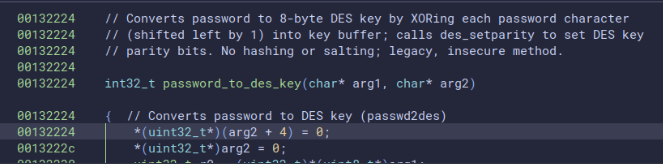
- A shortlist for BinaryNinja (
libhash.so,libiofrwk.so,libsystem.so).- Spoiler:
- A reversible, documented path to add
ttyS0::askfirst:/bin/shto the world.
Sequel bait (a.k.a. Next Episode):
- Deep‑dive those vendor libs in BinaryNinja.
Conclusion
Thanks for reading or not-reading the latest in my HH journey. May your boot delays be long, your serial adapters not upside‑down, and your uuencode blocks land in logs the first time. If you try this at home (on your own gear), let me know what you dig up!
PS: No routers were bricked in the making of this blog. 😉