
Background
As I mentioned in my about profile, I am a Blue Teamer by trade. Those of you stuck in the daily work of fixing vulnerabilities know it can be overwhelming. Patching windows are extensive, backlogs are continuing to grow, and every day is a fire drill.
Overview
Being in the field as a consultant, I am constantly pulled into table top exercises to build the next best “prioritization” model. Short answer, they don’t exist and every company is different. Your requirements should be specific to your organization to address the immediate risk in your company.
After running through a few of these exercises, I grew tired of working in a dated spreadsheet trying to make sense of a clients vulnerability backlog and prioritization model. So after talking with some colleagues and putting our ideas together, I built VulnHound.
What is it you ask? Well I think the best place to start is where did the cool name come from. Well there is a really nifty AD enumeration tool called, “BloodHound“…if you don’t know what it is, go peep it. (LMGTFY, link above :D). Loved the name, loved the tool, naturally it just felt right and the idea of VulnHound happened – minus literally every awesome part of it. So really, just the name.
VulnHound is written in python and leverages a CVE enrichment tool by ProjectDiscovery, called CVEMap. The core functionality is to leverage the json metadata in each enriched CVE in CVEMap and create custom calculations of severity based on your user input. Lets see it in action…
Design
As mentioned above, VulnHound leverages data from CVEMap. This data is pulled into data elements that create weighted calculations on a few factors:
- EPSS Score: A percentage (0%-100%) on the likelihood of a vulnerability being exploited in the next 30 days
- Age of Vulnerability: Age of the vulnerability in days
- CISA KEV: If a vulnerability has been added to the CISA Known Exploited Vulnerability list
- Asset Criticality: The severity or importance of the asset, whether it be externally facing or internal but a “crown jewels” asset
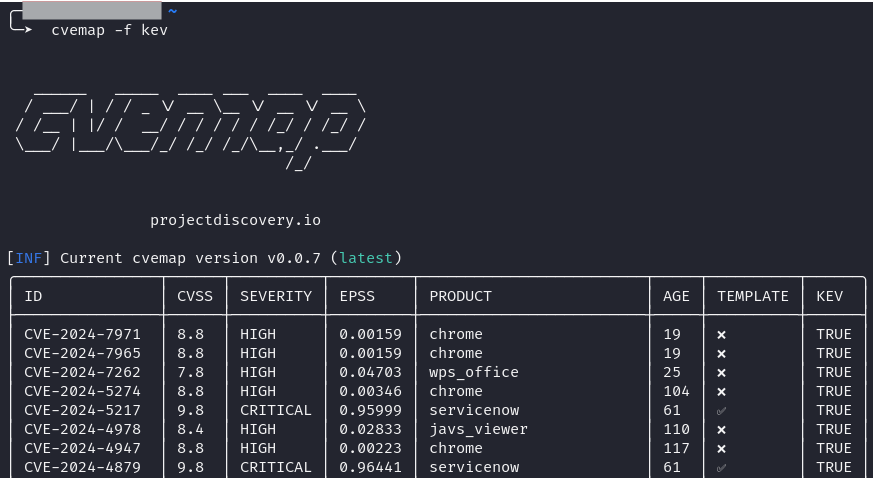
Taking a look at the screenshot below, you can get a feel of the data returned by CVEMap. Now note, this is a non-exhaustive list and by leveraging the -json flag, you can get really granular in the data and find enriching elements such as Proof of Concepts (PoCs) for working exploits.
VulnHound is built to be customizable by you, the user. As I previously stated, each organization should create prioritization models that are specific to them. A vulnerability flagged by CISA KEV may be critical to me, but less likely for you. With this, I built a rating configuration element that allows the analyst/engineer/etc to set custom weightings.
This capability can easily be triggered by executing the code and selecting menu item 2. Scoring Setup:
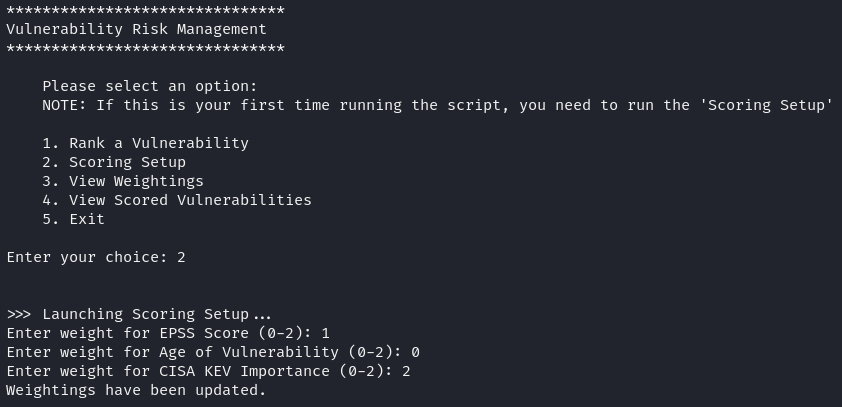
After entering this menu item, you are able to add the custom weighting elements that will be factored into the final risk severity calculation. Each field is rated (0-2), 2 being the most important.
Congrats! Now you are ready to roll and VulnHound is configured for use.
Use
VulnHound will save your weightings defined in a spreadsheet in the working directory that the script is located. For now, this is a bit barbaric, I know…but in time I will push some updates. On that note, don’t forget to check out and follow my GitHub for more code updates!
Ok – enough of that, lets get into using the tool.
Once you run VulnHound there is an intuitive menu that will provide you with various capabilities. For this post, we will mainly be looking at Ranking a Vulnerability.
Once you step into Ranking a Vulnerability you will be asked to enter the CVE ID and a few additional questions, which are specific to the asset criticality.
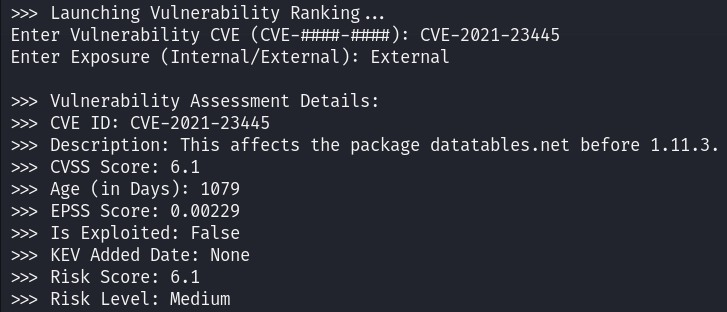
In this example, I have ranked this vulnerability against an External facing asset. Once rated, you will be provided with Vulnerability Assessment Details. This data structure returns the following fields:
- CVE-ID: The CVE ID of the vulnerability you entered
- Description: A detailed description of the vulnerability as filed through NVD when the CVE is disclosed
- CVSSv3.1 Score: The NVD rated CVSSv3.1 score
- Age of Vulnerability: Age of the vulnerability in days
- EPSS Score: Likelihood of exploitation in the next 30 days (0%-100%), shown in decimal representation
- Is exploited: If the CVE is registered on the CISA KEV list
- KEV Added Date: Data added to KEV if applicable
- Risk Score: Custom risk score that takes CVSS score and your weightings into consideration
- Risk Level: Suggested risk level for prioritization
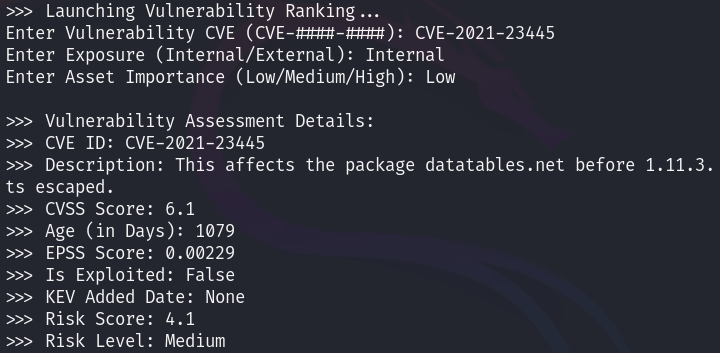
Now to show you how this can be used in a practical situation for those table top exercises I was talking about before, I will run the same CVE but against an internal asset that is of low priority, perhaps something in a lab.
As you can see, this Risk Score was dropped by 2 points, to a 4.1 but still remains a Medium and we will get into that in a minute.
Now to the rating logic. You are likely wondering why this is rated a Medium and not a Low. Well the answer is, there really is no right way to do this and you can easily change the values used to represent your risk levels. I will note that this Risk Level is something that I put together after talking with hundreds of clients in the VM space and after researching all of their models, this was as close to a standard as you could get.
| Low | Less than or equal to 3.99 |
| Medium | Greater than or equal to 4.0 and less than or equal to 6.99 |
| High | Greater than or equal to 7.0 and less than or equal to 8.99 |
| Critical | Greater than or equal to 9.0 |
Now I want this tool to be best suited for your needs. So feel free to clone it, fork it, change whatever you want. As I have said 100 times, VM is not a “one size fits all model”. You should create your own variations and play with your own weightings.
This isn’t meant to be a final solution on how you rank vulnerabilities but it could and should help you understand various scenarios as you work through your next prioritization discussion and rebuild.
I hope you had fun and I do hope you see value in a tool like VulnHound. Drop me a note and feel free to ask any questions you may have.
Until we meet again.
-Mark